Guide
How to print passport photos (4×6, 5×7 or A4)
Which sheet to choose
The Passport Photo Maker places each photo at its exact printed size on a 300 DPI sheet, with cut marks in the margins.
| Sheet | File | Where to print | 2 × 2 in photos | 35 × 45 mm photos |
|---|---|---|---|---|
| 4 × 6 in (10 × 15 cm) | JPG | Photo shop, kiosk, pharmacy photo counter | 6 | 8 |
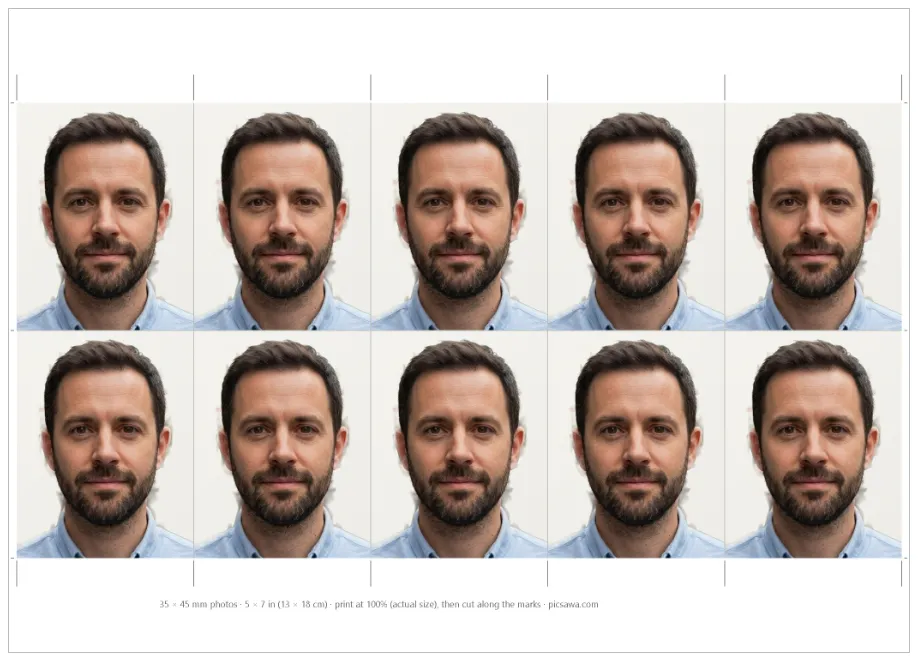
| 5 × 7 in (13 × 18 cm) | JPG | Photo shop, when you need more copies | 6 | 10 |
| A4 (210 × 297 mm) | Internet café, office or home printer | 15 | 32 |
The A4 sheet keeps 5 mm clear at each edge, because office printers can’t print to the edge. The 4 × 6 and 5 × 7 sheets go to the edge, as photo labs print them.
At a photo shop or kiosk
- Copy the 4 × 6 in JPG to your phone or a USB stick, or send it the way the shop asks.
- Ask for one 10 × 15 cm (4 × 6 in) photo print, gloss or matte. Say it is a passport photo sheet and must not be cropped, enlarged or “improved”.
- On a self-service kiosk, choose the 4 × 6 or 10 × 15 size and turn off any automatic crop, red-eye fix or enhancement.
- Before you leave, measure one photo (see below). If it is off, ask them to reprint without scaling.
The sheet already has the right shape for this paper, so nothing should need cropping.
At an internet café or office printer (A4)
- Open the A4 PDF in a PDF reader (Adobe Acrobat Reader, or the browser’s PDF viewer), not in an image viewer.
- In the print window, set Scale: 100% or Actual size. Turn off “Fit to page”, “Shrink oversized pages” and “Fit to printable area”.
- Choose A4 paper. Printing an A4 page on US Letter paper makes the printer shrink it.
- Set the paper type to photo paper (glossy) and the quality to best.
- Print one copy on plain paper first, measure it, then print on photo paper.
Ask the café whether it has photo paper; many offices only have plain paper, which won’t pass for a U.S. application (see the rules below).
Check the size with a ruler
Measure one photo, not the sheet. A 2 × 2 in photo must be 51 mm square; a 35 × 45 mm photo exactly that. If it comes out a few millimetres smaller, the page was scaled to fit: reprint at 100%. Then check the head: on a U.S. photo it must be 25–35 mm from the chin to the top of the head. When there is room, the sheet prints a note along its edge with the photo size and how to print it.
How to cut the photos
- Use a steel ruler and a sharp craft knife on a cutting board, or the paper trimmer most photo shops have. Scissors work, but they rarely cut straight.
- Line the ruler up with the grey marks in the margin and cut right across the sheet: first the outer strips, then between the rows, then between the photos.
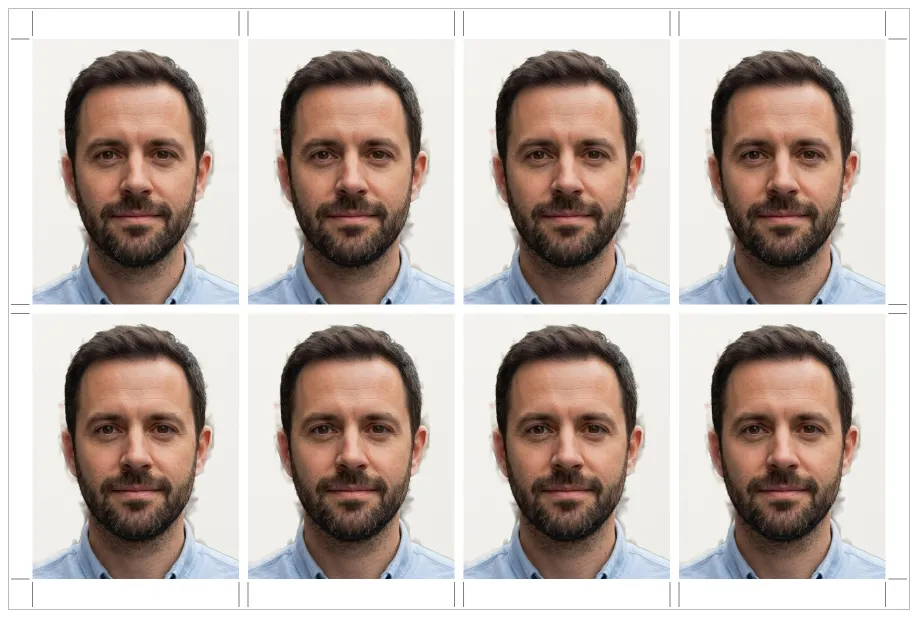
- Some layouts place photos edge to edge with no gap (six 2 × 2 in photos fill a 4 × 6 sheet exactly), so cut exactly on the line, not inside the photo.
- Hold photos by the edges, don’t fold or bend them, and keep them in an envelope until you hand them in.
What passport offices say about prints
- United States: colour, on photo-quality paper; the State Department manual refuses photos with visible pixels or damage to the face, such as creases or smudges.
- United Kingdom (paper form): GOV.UK asks for 2 identical photos, 45 × 35 mm, printed to a professional standard on plain white photographic paper with no border, and says they must not be a cut-down version of a larger picture. A photo booth or a shop that prints UK passport photos is the safer choice there.
- Canada: Canada.ca requires a commercial photographer and doesn’t accept photos printed at home.
Check your own country’s page before printing: rules on who may print the photo vary more than the photo size.
When the print goes wrong
- Photos too small: the page was fitted to the paper. Print at 100% or Actual size.
- Too dark or the wrong colour: office printers often print dark. Ask for a photo print at a shop instead.
- Lines or stripes: the inkjet is low on ink or needs a head cleaning.
- Cut marks missing: the edges were cropped. Print the A4 PDF, which keeps a margin.
How it looks in Picsawa
Screenshots of the free Passport & Visa Photo Maker tool, made with sample photos.
Sources
- Foreign Affairs Manual (state.gov) — 8 FAM 402.1 Passport photographs
checked 7 November 2026 - U.S. Embassy & Consulates in France — Passport photos
checked 7 November 2026 - gov.uk — Passport photo requirements (printed photos)
checked 7 November 2026 - canada.ca — Passport photos
checked 22 October 2026
Picsawa is not affiliated with any government. The issuing authority makes the final decision, so always check its official instructions before you submit.
Frequently asked questions
How many passport photos fit on a 4 × 6 print?
6 photos of 2 × 2 inches, or 8 of 35 × 45 mm. A 5 × 7 print holds 6 and 10, and an A4 page 15 and 32.
Can I print passport photos on plain paper?
No. The U.S. asks for photo-quality paper and the UK for photographic paper. Plain paper is fine only for a test print to check the size.
What does “print at 100%” mean?
Printing the file at its real size, without the printer shrinking or enlarging it. In the print window it is called Actual size, 100% or Scale 100, with Fit to page turned off.
What resolution are the print sheets?
300 DPI, the usual resolution for photo prints, with each photo placed at its exact size in millimetres.
Can I print an A4 sheet on US Letter paper?
Not at the right size: the printer would shrink it. In the U.S., order the 4 × 6 in sheet as a photo print instead.